Why LinkedIn is Full of Fake Headshots (And How to Spot Them)
Why LinkedIn is Full of Fake Headshots (And How to Spot Them)
I was hiring for a senior position last month when I noticed something odd. Three different candidates had suspiciously similar professional headshots—same lighting quality, same background blur, same impossibly flawless skin. All three claimed to be real photos taken by different photographers.
They weren't. They were AI-generated.
The LinkedIn Headshot Problem
LinkedIn has become ground zero for AI-generated professional photos. And I get why—professional headshots are expensive, sometimes costing $200-500. AI alternatives are free or cheap. For someone job hunting on a tight budget, the temptation is obvious.
But here's what people don't realize: using a fake professional photo can actually hurt your career more than an authentic but imperfect one.
How Recruiters and Hiring Managers Can Tell
After reviewing hundreds of LinkedIn profiles, I've developed a sixth sense for AI-generated headshots. Here's what gives them away:
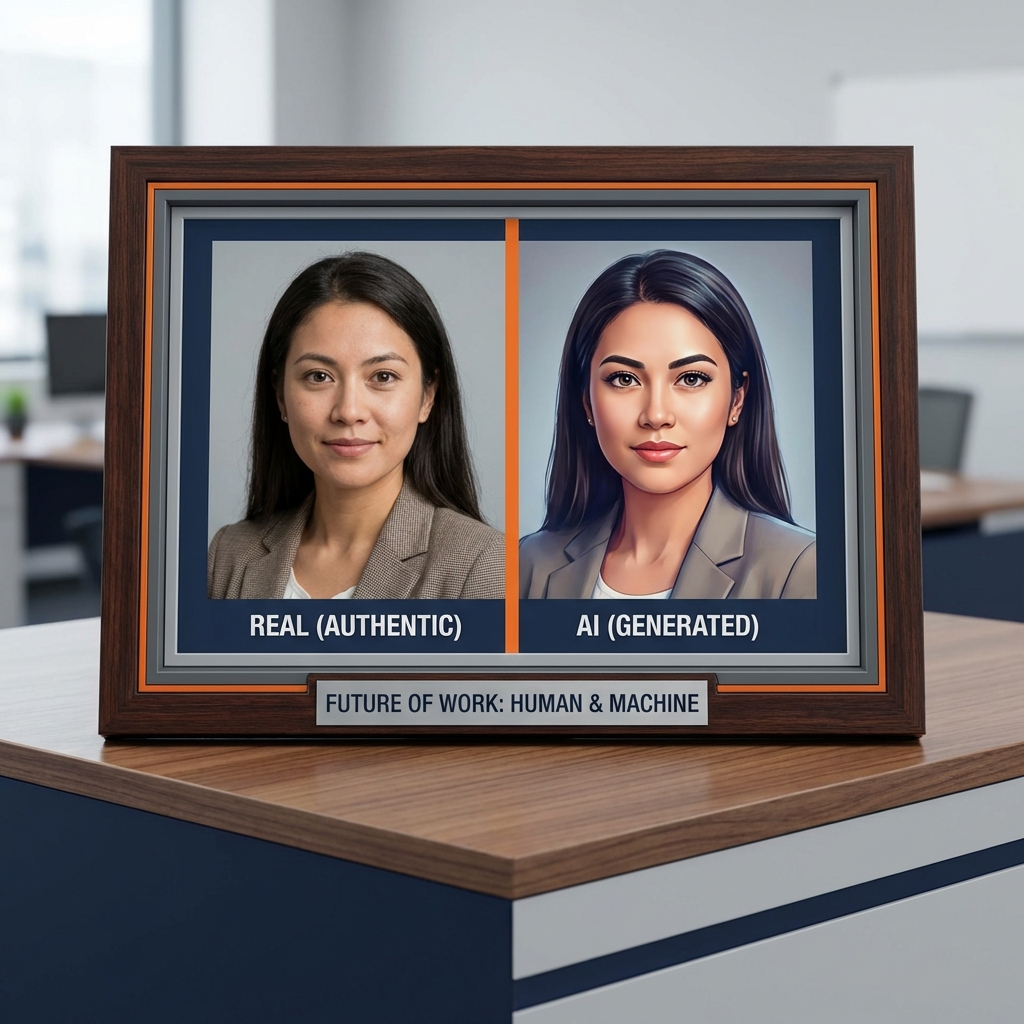
Too much perfection. Real professional headshots have tiny imperfections—a small skin texture, natural shadows, maybe a barely visible wrinkle. AI headshots look airbrushed to the point of being plastic.
Generic backgrounds. AI tends to create these soft, blurred backgrounds that look professional but generic. Real photographer backgrounds usually have some character—part of a window, specific office details, outdoor elements.
The "AI sheen." There's a certain quality to AI-generated faces that's hard to describe but easy to recognize once you've seen a few. The skin looks slightly too smooth, eyes are slightly too bright, everything is slightly too symmetrical.
Consistency issues. If someone's LinkedIn photo looks dramatically different from their other social media pictures, that's a red flag. Either they've aged backward or one photo isn't authentic.
Why This Matters More Than You Think
Using an AI-generated headshot on LinkedIn isn't just about vanity—it raises serious questions about integrity.
If you're willing to present a fake version of yourself in your professional profile, what else might you misrepresent? Your experience? Your skills? Your accomplishments?
I've rejected qualified candidates because their fake headshots made me question everything else on their profile. Once trust is broken, it's hard to rebuild.
The Real Impact on Job Seekers
Last week, I connected with a marketing professional who'd been job hunting for months with no success. Her resume was solid. Her experience was relevant. But her LinkedIn photo was obviously AI-generated.
When we talked, she admitted she'd used an AI headshot because she couldn't afford a professional photographer and was self-conscious about her appearance. She had no idea it might be costing her opportunities.
I explained that most recruiters would prefer an authentic smartphone selfie in decent lighting over a fake AI-generated "professional" photo. Authenticity beats artificial perfection.
She changed her photo that day. Two weeks later, she landed three interviews.
How to Spot Fake LinkedIn Headshots
Check their eyes. AI-generated eyes often have an unnatural glimmer or reflection pattern. Real eyes have more varied, natural light reflections.
Look at ears and hair. These are tough for AI. You might notice hair strands that don't quite connect right or ears that are slightly asymmetrical in unnatural ways.
Examine clothing edges. Where clothing meets skin or background, AI often creates slightly fuzzy or inconsistent edges.
Compare to tagged photos. If they have photos where others tagged them, compare those to their headshot. Huge discrepancies suggest manipulation.
Trust your gut. If something feels off about a photo—too perfect, too generic, too "uncanny valley"—it probably is.
What Job Seekers Should Do Instead
Option 1: DIY Professional Photo - Use a smartphone with portrait mode - Find good natural lighting (near a window works great) - Wear professional attire - Use a plain wall as background - Take multiple shots and choose the best
Option 2: Affordable Alternatives - Local photography students often shoot headshots cheap or free for portfolio building - Some coworking spaces offer professional photo sessions - Check Groupon for photography deals
Option 3: Embrace Authenticity - A genuine, friendly photo beats a fake "professional" one - Smile naturally - Be yourself - Your photo should look like you on your best day, not like a different person entirely
The Bigger Picture
The proliferation of fake LinkedIn headshots is creating a trust crisis in professional networking. When everyone's photo might be fake, how do we verify anyone's identity?
I've heard of cases where people stole LinkedIn profile photos, created fake accounts, and used them for fraud. The more AI-generated headshots there are, the harder it becomes to spot these imposters.
My Advice to Professionals
If you're using an AI-generated LinkedIn headshot, change it. Today. Even if your replacement photo isn't as "perfect," it's better than risking your professional reputation.
If you're evaluating candidates, look carefully at their photos. Don't automatically reject someone for an AI headshot, but do factor it into your overall assessment of their integrity.
And if you're building your professional brand, invest in authenticity. Real photos, real accomplishments, real you. In a world of fakes, authentic professionals stand out.
Your LinkedIn photo should open doors, not raise red flags. Make sure it's actually you.
Explore More Insights
Discover more technical articles on AI detection and digital forensics.
View All Articles